Choose a template
How to Pick the Right Scene for the Person in Your Photo
To choose an AI video template, answer three quick questions about the person in your photo. Every scene starts from one photo of one face, and the sample shows what it looks like before you spend anything.
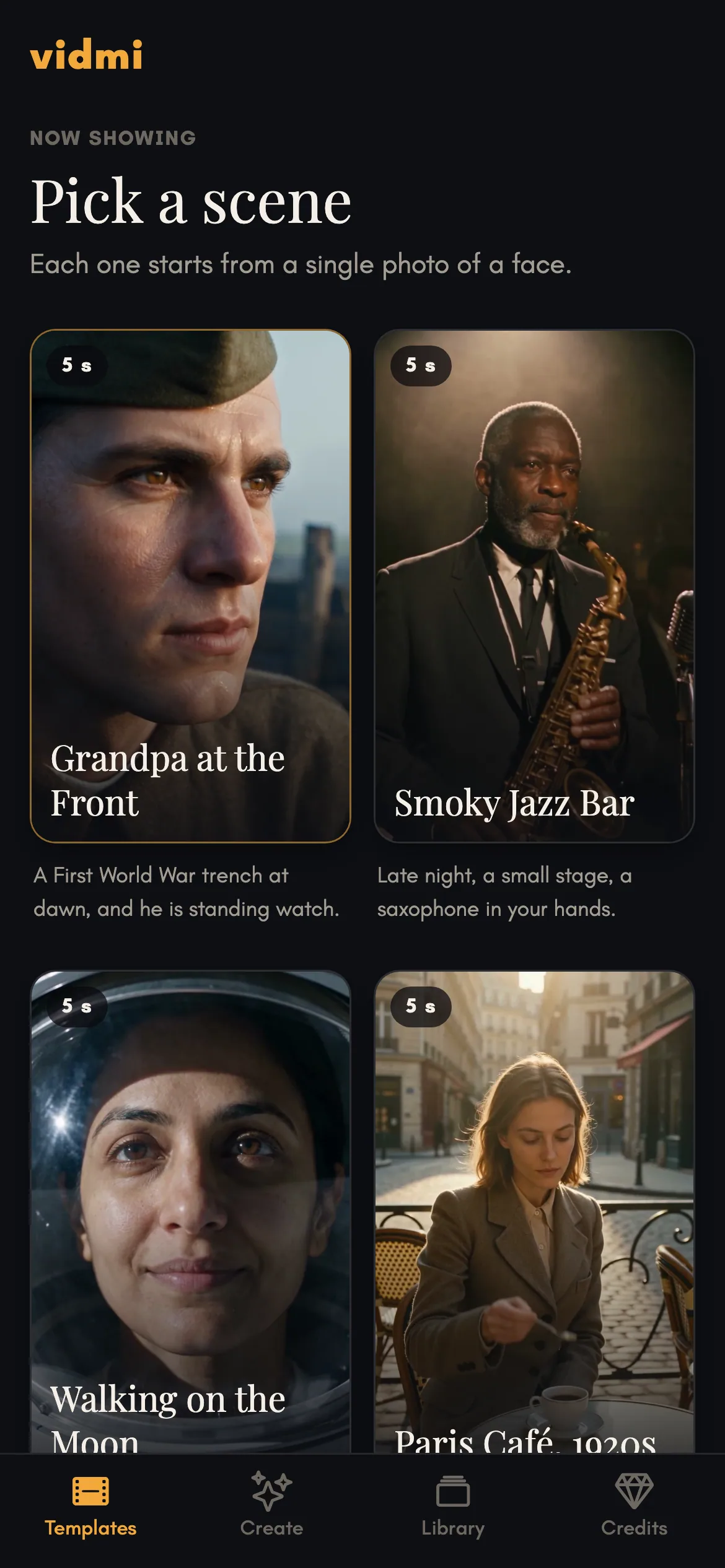
Start with the person
On the Templates tab, every card plays its sample as you scroll, and it is easy to tap the first one you like.
Pause for a second. A scene works when it fits the person in your photo. So begin with the person, then find their scene. Three questions do most of the work.
This is face swap video in vidmi’s sense: the face from your photo goes into one of vidmi’s ready-made scenes, not yet into a video you upload. For the full picture, see face swap video.
1. How old is the photo?
The age of the photo points to an era.
- A faded print of a great-grandparent. Try a scene from their own time. Grandpa at the Front stands him in a First World War trench at dawn. Field at Dusk makes him a nineteenth-century farmer at day’s end. Paris Café, 1920s gives her a terrace table and a cup of coffee.
- A photo from the last few decades. Nearly every scene fits. Choose by personality.
- A selfie from this week. Go somewhere you have never been. Walking on the Moon, Deep-Sea Explorer and Rooftop Hero feel made for the person holding the phone.
A face from 1915 on a rooftop above a modern city is playful. The same face in its own era can quiet a room. Decide which feeling you want before you tap.
2. Who are they?
Think of how the family describes them, then match.
- The steady one, who never complained. Grandpa at the Front or Field at Dusk.
- The music lover who sings in the car. Smoky Jazz Bar, with a saxophone in their hands.
- The dreamer who watched every launch. Walking on the Moon.
- The romantic with a passport full of stamps. Paris Café, 1920s.
- The calm, disciplined one. Samurai Street at Dusk, as the lanterns come on.
- The adventurer who never sat still. Viking Longship or Deep-Sea Explorer.
- The storyteller with a wide hat and a slow drawl. Wild West Main Street.
- The protector everyone calls first. Rooftop Hero.
3. What is the moment?
The occasion sets the tone.
- A tribute or a day of remembrance. Quiet scenes carry it. Try Grandpa at the Front or Field at Dusk, and choose “Sounds only” or “Silent” for a calmer video.
- A birthday or a group chat surprise. Go big. Rooftop Hero, Wild West Main Street or Viking Longship.
- An anniversary or Valentine’s Day. Paris Café, 1920s, or Smoky Jazz Bar.
- A graduation or a hard-won finish. Walking on the Moon, or Rooftop Hero for a night above the city.
- No reason at all. Deep-Sea Explorer and Samurai Street at Dusk reward anyone who loves atmosphere.
For more by holiday, life event and hobby, browse use cases.
The 30-second version
In a hurry? Answer one line and go.
- Is the photo older than your parents? Grandpa at the Front, Field at Dusk or Paris Café, 1920s.
- Do they love an audience? Smoky Jazz Bar, Rooftop Hero or Wild West Main Street.
- Do they come alive outdoors? Viking Longship, Wild West Main Street or Field at Dusk.
- Do they daydream? Walking on the Moon, Deep-Sea Explorer or Samurai Street at Dusk.
Still torn between two? Watch both samples again with the person in mind. If that does not settle it, make both, one after the other, and keep the one that looks like them.
Check the photo against the scene
Every scene asks for the same thing from your photo: “One clear face, looking at the camera, good light. No sunglasses or group shots.”
Old prints need a little care. Scan or photograph them flat, in even light, then crop to the one face you want. Our guide to animating an old photo walks through it. For any photo, how to choose the best photo covers what helps a scene most.
Close, but not quite
Found a scene that is nearly right? Make it theirs.
- Add a touch. The “Customise” box takes small details, “like a red scarf or falling snow”. See how to customize a template. Try “his old flat cap” on Field at Dusk, or “a white rose on the table” in Paris Café, 1920s.
- Borrow the camera. If you love how a sample moves, switch on “Use this video as reference”. Your video then follows the sample’s camera moves and timing closely. The switch is not available on a free video, and it costs more credits than leaving it off.
- Write your own. If no template fits, tap “Write my own instead” and describe the scene in a sentence. Here is how to write one.
See every scene and its sample on the templates page, learn more about scene templates, or head back to photo to video.
Questions
Does every template work with any face photo?
Any scene can start from any face photo. The app says "Each one starts from a single photo of a face." It asks for one clear face, looking at the camera, in good light. No scene promises a perfect likeness.
Will my video look exactly like the sample?
No. Your video is the same scene starring the face in your photo, not a copy of the sample. The samples for Grandpa at the Front, Smoky Jazz Bar and Walking on the Moon were made with Max, while every template starts on Quality.
Can I change the length or shape of a template?
Yes. Every template is "5 s · 9:16" by default. Change "Length" and "Shape" in the Format section before you make your video.
Can I try a template on my free video?
Yes. Free videos are "480p, 3 s on Fast", and you can still pick any template.