Customize a template
How to Customize an AI Video Template With One Detail
To customize an AI video template, type one small detail into its "Customise" box, like a red scarf or falling snow. It adds to the ready-made scene and does not replace it.
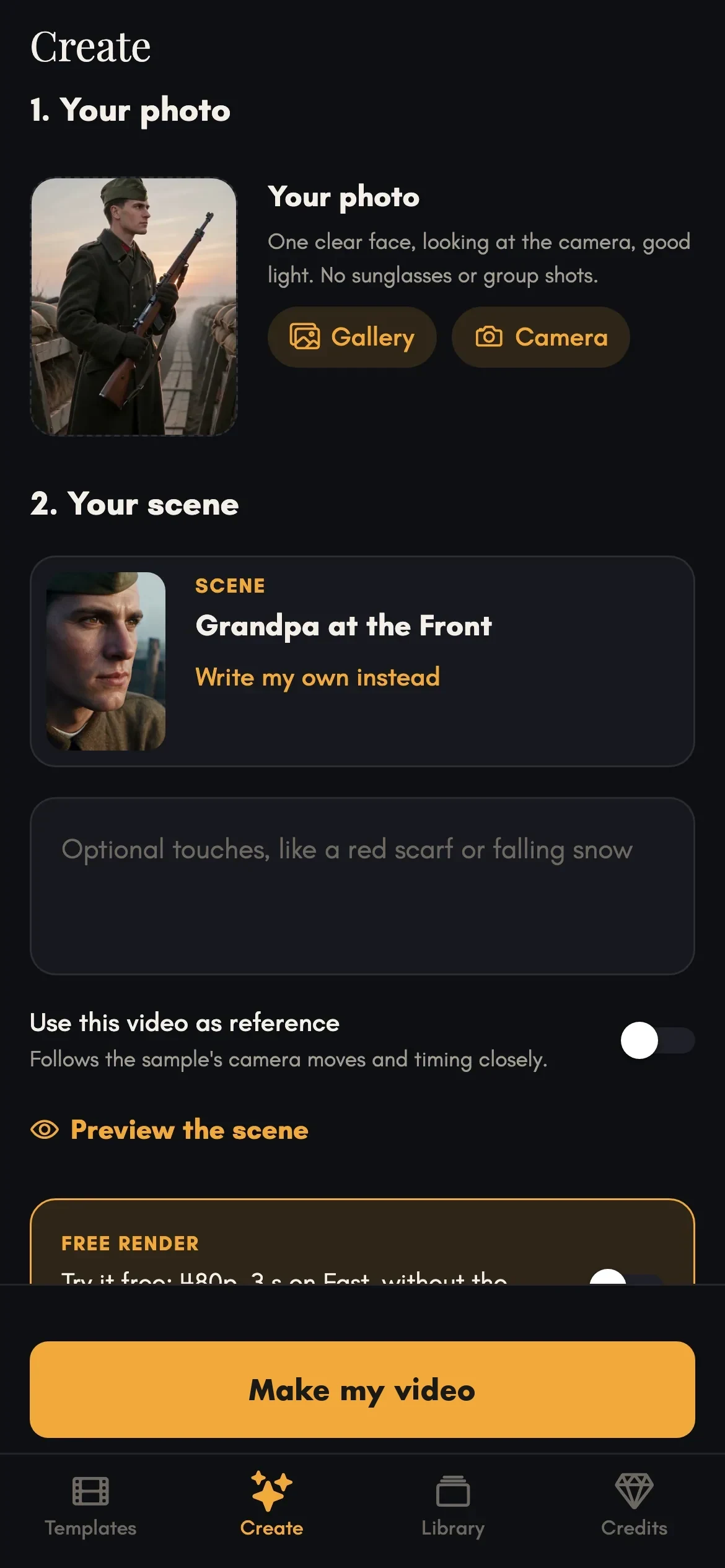
Where the Customise box is and what it takes
In vidmi on your iPhone, pick a scene on the “Pick a scene” grid and open it. Under the sample you will find the “Customise” box, with the app’s hint: “Add your own touches, like a red scarf or falling snow.”
The box is optional and takes up to 240 characters. It appears again on the Create tab once a scene is chosen.
A touch adds to the scene: the place and the era stay. For a different scene altogether, tap “Write my own instead” and read how to write a scene. To see what each ready-made scene looks like first, browse the templates.
Five rules that make a touch land
1. One detail, said clearly. A video lasts a few seconds. The eye catches one new thing, maybe two. “A red scarf” lands. “A red scarf, a pocket watch, a cane and a mustache” turns to noise.
2. Make it big enough to see. On a phone screen, a ring disappears and a long coat does not. Choose details that fill part of the frame: clothing, sky, weather, a prop in the hands.
3. Lead with color. Color is the fastest way to change how a scene feels. A yellow raincoat in a gray fjord. A single green lamp in a dark bar. Name one strong color and leave the rest alone.
4. Stay in the world. The best touches belong to the scene’s place and time. Snow on a Viking ship feels true. A smartphone on a 1920s café table feels like a mistake. If your idea breaks the setting, write your own scene instead.
5. Describe it, don’t direct it. Write what the viewer sees, in plain words, as if telling a friend about a photograph. “Snow settling on his shoulders” works better than instructions or a wish list.
If you only try one kind of touch, try weather. Snow makes a scene quiet and tender, rain makes it moody, golden light feels like a memory. For a full set of winter scenes, see the winter and snow prompts.
Keep it respectful when the person is real and the scene is historical. A letter, morning light over the trench: quiet touches suit a tribute better than spectacle.
A detail that means something to you works best. Grandma loved red, so the café scarf is red.
A touch for every scene
Start here, then make it yours. Each line fits in the box with room to spare.
| Scene | Weather or light | Wardrobe or prop |
|---|---|---|
| Grandpa at the Front | thin mist over the trench, first sunlight | a letter from home folded in his hand |
| Smoky Jazz Bar | a single blue spotlight on the stage | a white tuxedo jacket and a loosened bow tie |
| Walking on the Moon | a crescent Earth glowing in a black sky | a small bunch of wildflowers in the glove |
| Paris Café, 1920s | light rain on the awning, wet cobblestones | a red scarf and a cloche hat |
| Samurai Street at Dusk | snow falling between the lanterns | a dark blue kimono with a white crest |
| Viking Longship | heavy snow over the fjord | a fur cloak and a round wooden shield |
| Wild West Main Street | a red sunset sky behind the storefronts | a sheriff’s star pinned to a leather vest |
| Deep-Sea Explorer | a glowing jellyfish drifting past the window | a yellow diving suit |
| Rooftop Hero | rain and neon reflections on the rooftop | a long black coat moving in the wind |
| Field at Dusk | a golden sky with birds flying home | a straw hat and rolled-up shirtsleeves |
You can mix one from each column. “Light rain on the awning, and a red scarf” is still one clear picture.
Five recipes to try
Each recipe is a scene, a touch and the options that suit it. Every video is still one face from one photo.
Three of them switch on “Use this video as reference”. That switch is not part of a free video and costs more credits than leaving it off, so those three are for a paid video.
1. Wild West, after dark
- Scene: Wild West Main Street
- Customise: “night, heavy rain, lantern light on the wet boardwalk”
- Reference: on, to follow the sample’s camera moves and timing closely
- Sound: “Sounds only”, for the sounds of the street and no voices
The idea: the midday street, asked for at night in the rain. It is a bigger touch than a scarf, so check the result and simplify if it does not land. See the Wild West scene.
2. A birthday on the Moon
- Scene: Walking on the Moon
- Customise: “a bunch of bright birthday balloons held in one glove”
- Sound: “Silent”, which suits the vacuum and leaves room for your own message
Send it on the morning of the birthday. More in birthday video prompts.
3. Jazz bar, holiday edition
- Scene: Smoky Jazz Bar
- Customise: “string lights over the stage and a red velvet jacket”
- Reference: on, to follow the sample’s camera moves
- Sound: “Voices + sounds”, for a room with people in it
4. Viking at first light
- Scene: Viking Longship
- Customise: “sunrise breaking through the mist, gold light on the water”
- Sound: “Sounds only”, for the sounds of the water and no voices
- Format: 10 s, 16:9 for a bigger screen
A longer length gives a sunrise more room.
5. Samurai street in winter
- Scene: Samurai Street at Dusk
- Customise: “the first snow falling, a paper umbrella in one hand”
- Reference: on, to follow the sample’s timing
- Sound: “Sounds only”
Reference only works on a ready-made scene. Learn what it follows in Use this video as reference.
Test on Fast, finish on Quality or Max
Customizing is trial and error, so make the trial small. Run a new idea on Fast at a short length.
When the touch and the mood are right, tap “Make another” and remake it on Quality or Max, at the length and shape you plan to share. The button shows what a video costs before you tap.
Change one thing between tries. If you change the touch, the reference and the sound at once, you will not know which one made the difference.
When a touch becomes your own scene
Sometimes a touch keeps growing until the template is just a memory: the rain becomes a storm, the street becomes a harbor, the cowboy becomes a sailor. That is your cue to tap “Write my own instead” and describe the whole scene in your own words, as in how to write a scene.
Not sure the scene fits the person in your photo? Start with how to pick the right scene.
For the basics of the box itself, see Customise. Everything here starts from the photo to video flow in the app.
Questions
What if my touch doesn't show up the way I pictured?
Nothing guarantees a touch will appear exactly as written. Make it simpler and more visible. Swap "a vintage brooch" for "a large silver brooch on her coat". Then tap "Make another" and try again with the same scene.
Can I add a second person with Customise?
Each video starts from one photo of one face. Customise is for wardrobe, weather, props and light around that person, not for adding someone else from another photo.
Can I use the reference switch on a free video?
No. A free video is 480p, 3 s on Fast, without "Use this video as reference". You can still pick a ready-made scene, the shape and the sound.
Can I choose what someone says?
No. With "Voices + sounds" the scene can have people talking or singing, but you can't set the words. Use Customise for what the viewer sees.