Length guide
How Long Should a Short Video Be? 3, 5, 7 or 10 Seconds
How long should a short video be? As short as it can be while the moment still lands. A vidmi video is 3, 5, 7 or 10 seconds, and each length has one job.
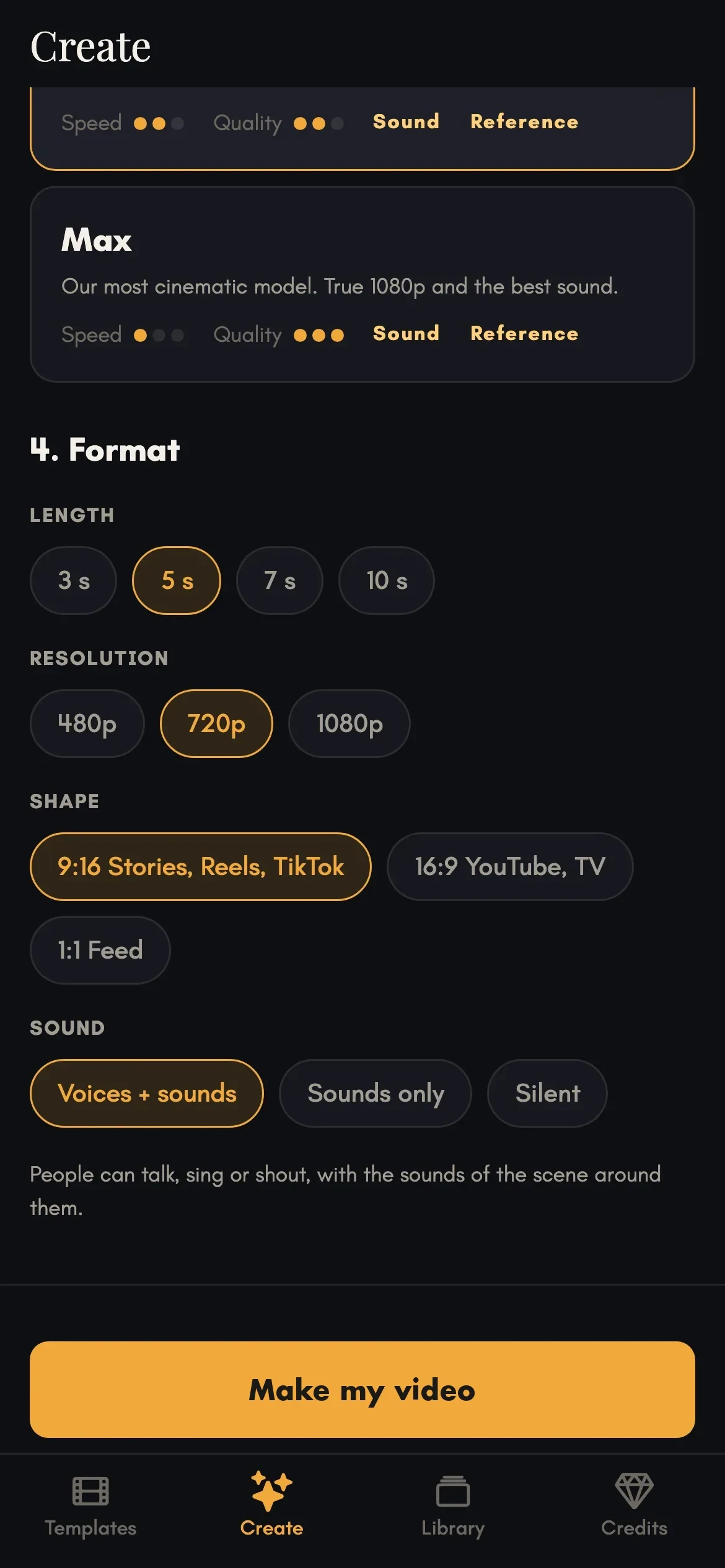
A vidmi video is 3, 5, 7 or 10 seconds, and the right one is the shortest that lets your moment land. The app starts you at 5 seconds, or at the template’s length if you picked a template.
- 3 seconds: the reaction, one beat.
- 5 seconds: the scene, two beats.
- 7 seconds: the story beat, when the setting matters.
- 10 seconds: the tribute, for people you love.
If you came here with a Reel, a Short or a TikTok in mind, this page answers for one moment of a few seconds. It says nothing about what any platform favors. Pick the length by what the moment has to do.
Count beats, not seconds
A beat is one thing happening. A head turns. A smile breaks. A lantern comes on.
Ask how many beats your idea has. One beat is a glance. Two is a small story. Three is a scene with a beginning, a middle and an end.
Then give each beat a couple of seconds and stop. Anything past that is the viewer waiting for something that already happened.
You set it on the Create tab. Under “4. Format”, “Length” offers 3 s, 5 s, 7 s and 10 s.
3 seconds: the reaction
One beat, one surprise. A face turns, a lantern flickers on, a look straight into the camera.
It works when the picture itself is the joke. Your brother, who has never been on a horse, on a Wild West main street at midday. Nobody needs a plot, only one look to send to the group chat.
A finished film loops on the “Your video” screen, so one clean beat can replay a few times and still feel fresh.
It is also the length of the free try. The app’s line is “Try it free: 480p, 3 s on Fast.”, which makes 3 seconds the natural place to start.
5 seconds: the scene
Enough time for a place to exist and for something to change. Late night, a small stage, a saxophone in your hands, and then a look up and a grin.
That second beat is what makes it feel like a film instead of a moving photo.
Five seconds is the length of every template sample. If you are not sure, stay here. It is long enough to feel directed and short enough to watch twice.
7 seconds: the story beat
Some scenes are about the place as much as the person. A longship sliding through a misty fjord. Gray dust under your boots with the Earth above the horizon.
Seven seconds lets the viewer look around before the face takes over.
It also suits scenes you wrote yourself, where the description has a before and an after. Try this one in “Describe your scene”:
- “Me walking down a dusty main street at noon, stopping to look up at the sun.”
The extra time lets the walk become a moment. Write a scene that holds together has more ways to build one.
10 seconds: the tribute
The longest choice is for films people will sit and watch. A grandfather keeping watch at dawn. A farmer standing tall in a field at dusk.
He does not need to do much. He needs time, and so does the family watching, long enough to take the scene in.
Ten seconds with nothing changing can feel slow, so give the scene one small change: the light coming up, a turn of the head. The three-act short shows how to plan a few seconds with a beginning and an end. Quality or Max suits a film like this, with the sounds of the scene around him.
Where it will play
Think about where the film ends up.
- A feed or a story. Put the surprise first and keep it to 3 s or 5 s. Check the shape too: aspect ratio by platform shows which suits where.
- A message to one person. Someone who knows the face is likely to watch to the end. Go 7 s or 10 s without worry.
- A screen at a family dinner. Choose “16:9 YouTube, TV” under “Shape” and take the full 10 s. A room watches slower than a thumb scrolls.
Short first, then long
Longer films take longer to make, and the credits shown on the button can change with the length. So draft short.
Make a 3 second version to check the photo and the scene. Then tap “Make another” and pick the full length once you know it works. Seven habits for your credits has more on trying ideas cheaply.
One more thing to plan around: a film says one moment well. If your idea has three parts, make three clips and join them in iMovie.
The lengths themselves, and what a longer one changes in credits and waiting, are on the video length page. New to all of this? Photo to video walks from the photo to the finished film.
Questions
How long are the templates?
Every template is 5 seconds, matching its sample film. The template screen shows it as "5 s · 9:16". You can change "Length" before you make your video.
How long is a free video?
Three seconds. The app says it plainly: "Try it free: 480p, 3 s on Fast."
Does a longer video take longer to make?
Yes. The progress screen says "Usually 1 to 3 minutes" for a short Fast video, and longer for 7 to 10 seconds. You can leave the screen, and vidmi tells you when your film is ready.
Can I join several clips into one longer film?
Not inside vidmi. Save each clip to Photos and put them together in iMovie or any video editor you like.