Video length
AI Video Length: 3, 5, 7 or 10 Seconds
A vidmi video is 3, 5, 7 or 10 seconds. New videos and every ready-made scene start at 5, and 10 seconds is the longest you can make.
The four lengths: 3, 5, 7 and 10 seconds
How long can AI videos be in vidmi? Four lengths: 3 s, 5 s, 7 s, and 10 s. Ten seconds is the longest, and there is no longer option. A story that needs more than that is several videos joined in an editing app, which the section below explains.
vidmi is an iPhone app that makes a short video starring the face in one photo. Each video is one scene of a few seconds.
The length is set to 5 seconds when you start. Pick a ready-made scene and it is set to 5 seconds as well. Each length gives a scene a different shape, from a single look at 3 seconds to a small beginning and end at 10. For which length suits which idea, read the guide to choosing a duration. It also shows how to count the beats in an idea before you pick.
Where you set it
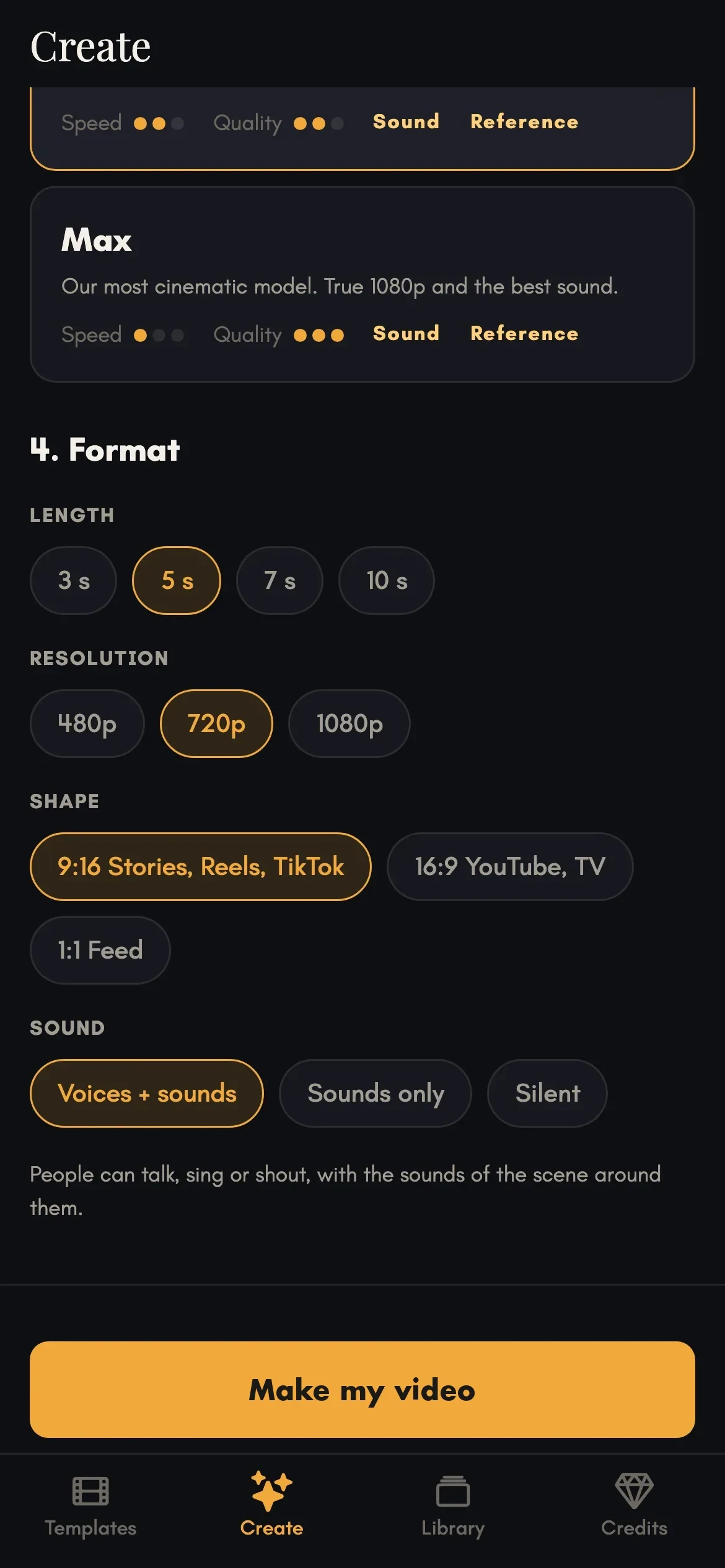
On the “Create” tab, scroll to “4. Format”. The first row is “Length”, with four chips: 3 s, 5 s, 7 s, and 10 s. Tap one and you are done. Change it any time before you tap the main button.
The length you chose shows up later on “Your video”, right next to the resolution and shape.
What a longer video changes: credits and waiting time
The cost. Each model card in “3. Model” shows what your video will cost in credits, and the number follows your settings live. Longer videos can use more credits. The main button reads “Make my video · N credits”, with your own number in place of N, so you see the cost before you tap. See how credits work.
The wait. Short Fast videos usually land in 1 to 3 minutes. A 7 or 10 second video takes longer, more so on Quality or Max, or at 1080p. You do not have to watch. Leave the screen and, if you allow notifications, vidmi tells you when “Your video is ready”. The help page on how long a video takes has the details.
Length on the free try
The free try is fixed at 3 seconds. The app says it this way: “Try it free: 480p, 3 s on Fast.” You can still choose the scene, the shape, and the sound, so it is a quick way to try a scene with your photo before you go longer.
Need more than 10 seconds?
A single vidmi video stops at 10 seconds. To tell a longer story, make one video per beat from the same photo and play them back to back. Each beat is a separate video with its own cost in credits. The guide to storyboarding a short film shows how to plan the beats, and editing in iMovie shows how to join them on your iPhone.
If short is what you are after, the short AI video generator page is the place to start.
Pair length with shape
You pick length and shape in the same “Format” section, along with resolution and sound. The app labels the shapes by where they go: “9:16 Stories, Reels, TikTok”, “16:9 YouTube, TV” and “1:1 Feed”. Compare the shapes.
Questions
What lengths can I choose?
Four. 3 s, 5 s, 7 s, and 10 s. New videos start at 5 seconds, and every template starts at 5 seconds too.
Does a longer video cost more?
It can. Each model card shows its credit cost for your current settings, and that cost updates as you change the length. You always see it on the main button before you tap.
Can I change the length of my free video?
No. The free try is 3 seconds, made on Fast at 480p. You can still pick the scene, the shape, and the sound.
Can I make an AI video longer than 10 seconds?
Not as one video. 10 seconds is the longest. For a longer piece, make several videos and join them in an editing app such as iMovie.
Do longer videos take longer to make?
Yes. A short Fast video is usually ready in 1 to 3 minutes. Films of 7 to 10 seconds take longer, and you can leave the screen while yours is made.