Video templates
AI Video Templates: Ready-Made Scenes You Star In
vidmi's AI video templates are ready-made scenes, each with its own sample video. Add one photo of one face and get a 5-second vertical video starring that face.
What an AI video template is in vidmi
A template is a scene that is already written for you: the place, the hour, the light and the mood are decided, and a sample video shows it in motion. Your part is the face.
This is face swap into vidmi’s own scenes, not yet into a video you upload. One photo, one face, one person per video, in an iPhone app with no account. It is free to try, and the scene does not put words on screen or let you choose what anyone says.
Open the “Templates” tab and you land on “Pick a scene”: a two-column grid of cards, each playing its sample video as you scroll. Every card shows a title, one line about the moment, and its length. The app puts it simply: “Each one starts from a single photo of a face.”
What every scene comes with
- A setting. A smoky jazz bar after midnight. An old wooden street as the lanterns come on. The prow of a longship in a misty fjord.
- A mood. Quiet and reverent, playful, heroic, or lonely and grand. The scene carries the feeling so you don’t have to describe it.
- A sample video. You see the scene in motion before you commit, with its own pace and camera moves.
- A ready format. 5 seconds, vertical 9:16, built for Stories, Reels, and TikTok.
What the sample video tells you before you make yours
Tap a card and the sample plays, with sound on or off and a replay control. Five seconds says more than a paragraph. Watch with these in mind.
The light. Dawn gray in a trench. Lantern glow on an old wooden street. Hard white sun on a dusty main street. The light sets the feeling of your whole film.
The pace. Does the scene hold still and let the moment breathe, or move from the first frame?
The camera. Does it start wide and push in to the face, drift past the subject, or hold a steady close-up? This is the part a description can’t quite capture, and the part the sample shows best.
The sound. Turn it on and listen to the place and the people in it. If you like what you hear, choose “Voices + sounds” or “Sounds only” when you set the format. If you would rather add your own music later, choose “Silent”.
The framing. A face in close-up wants a clear, front-facing photo. A figure in a wide landscape still starts from that same single face.
Two habits help. Watch twice, once for the feeling and once for the camera. Then test on Fast, the quickest and cheapest model, before you spend more on a version you love. More ideas are in the guide to saving credits.
One honest note: your film is the same scene starring the face in your photo, not a copy of the sample. The samples for Grandpa at the Front, Smoky Jazz Bar and Walking on the Moon were made with Max, and every template starts on Quality.
From tap to video in five steps
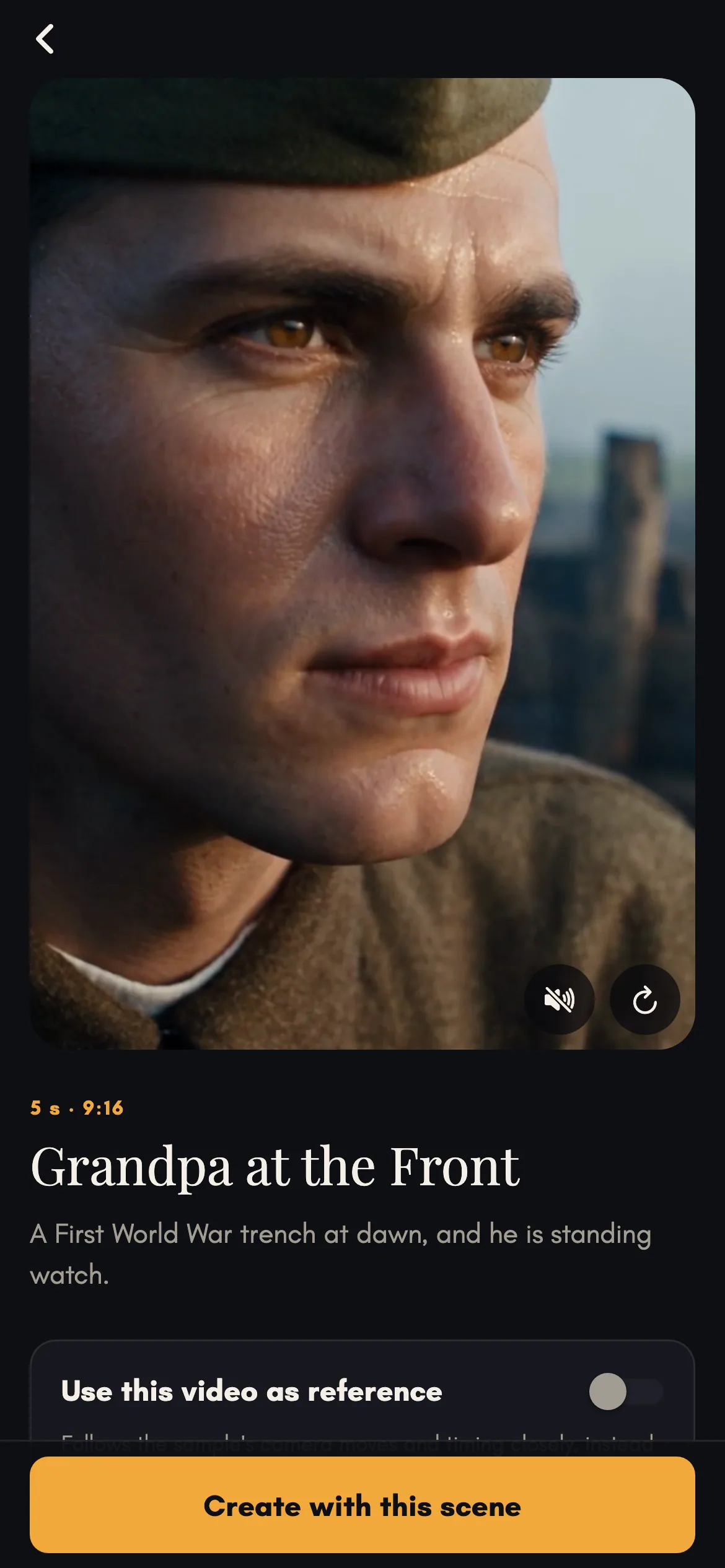
- Tap a card. The template screen opens and the sample plays. Below it: “5 s · 9:16”, the title, and the scene’s description.
- Make it yours, if you like. Type a detail into the “Customise” box. It is optional.
- Choose how closely to follow the sample. Switch on “Use this video as reference” when you want your film to follow the sample’s camera moves and timing closely.
- Tap “Create with this scene”. You go to Create with the scene already filled in. Add a face photo from “Gallery” or “Camera”, pick a model, and check the format.
- Watch it arrive. You can leave the screen while your video is made. When it is ready, it waits in your Library to share or save.
Try it with “Grandpa at the Front”. Tap “Create with this scene”, then add a clear photo of your grandfather, looking at the camera in good light. Or pick “Walking on the Moon” and add a selfie, for a scene of gray dust with the Earth above the horizon.
Make a scene yours: Customise and the reference switch
“Customise” reads “Add your own touches, like a red scarf or falling snow” and holds up to 240 characters. Two touches to try:
- On Samurai Street at Dusk: “light rain and a paper umbrella”
- On Wild West Main Street: “a long tan coat and a wide-brimmed hat”
Keep a touch to a detail or two. Read more on Customise.
The reference switch, “Use this video as reference”, is off by default. It follows the sample’s camera moves and timing closely, instead of only its description. It is not available on a free video, and it costs more credits than leaving it off. The reference video page covers when it pays off.
A template or your own words
A template is the shortest route to a video. The scene is written, the sample shows the kind of film it makes, and you only bring the face.
When the moment you want isn’t in the grid, tap “Write my own instead” and describe your scene in a sentence. Start with a template to see what vidmi can do, then write your own scene. If you came for the face swap side of this, the face swap video page explains what goes where.
The scenes you can start in
At launch, you can step into a First World War trench, a jazz club, the Moon, a 1920s Paris café, a samurai street at dusk, a Viking longship, a Wild West main street, a deep-sea submersible, a city rooftop at night, and a nineteenth-century field at day’s end.
Compare Paris Café, 1920s, a terrace table with the street going by, with Samurai Street at Dusk, where lanterns come on along an old wooden street. Watch both with sound on and you will know which suits the photo in your hand.
See every scene in motion in the full template gallery. Not sure where to begin? Pick the right template for your photo and your moment, or read the help page on choosing a scene.
Questions
How many templates are there?
There are 11 scenes at launch, from a First World War trench at dawn to a walk on the Moon. Browse them all on the templates page.
Can I use a template for my free video?
Yes. Free videos can start from any template. They are made on Fast at 480p and 3 seconds, and the reference switch is not available on them.
Can I change the scene a template shows?
You can add your own touches in the "Customise" box, like a red scarf or falling snow. For a completely different scene, tap "Write my own instead".
Will my film look exactly like the sample?
No. It is the same scene, starring the face in your photo, but a new video and not a copy of the sample. To follow the sample's camera moves and timing closely, turn on "Use this video as reference".
Why do some samples look richer than my video?
The samples for Grandpa at the Front, Smoky Jazz Bar and Walking on the Moon were made with Max. Templates start on Quality. Max is the most detailed model, with the best sound, and you can pick it on the Create tab.
How long is a template film?
Every template starts at 5 seconds in 9:16. You can still change the length, resolution, shape, and sound before you create.