From the studio
How We Choose New Scenes
The ready-made scenes in vidmi are a short list on purpose. Here are the four questions we ask of a scene idea, and how to describe your own scene if the one you want is missing.
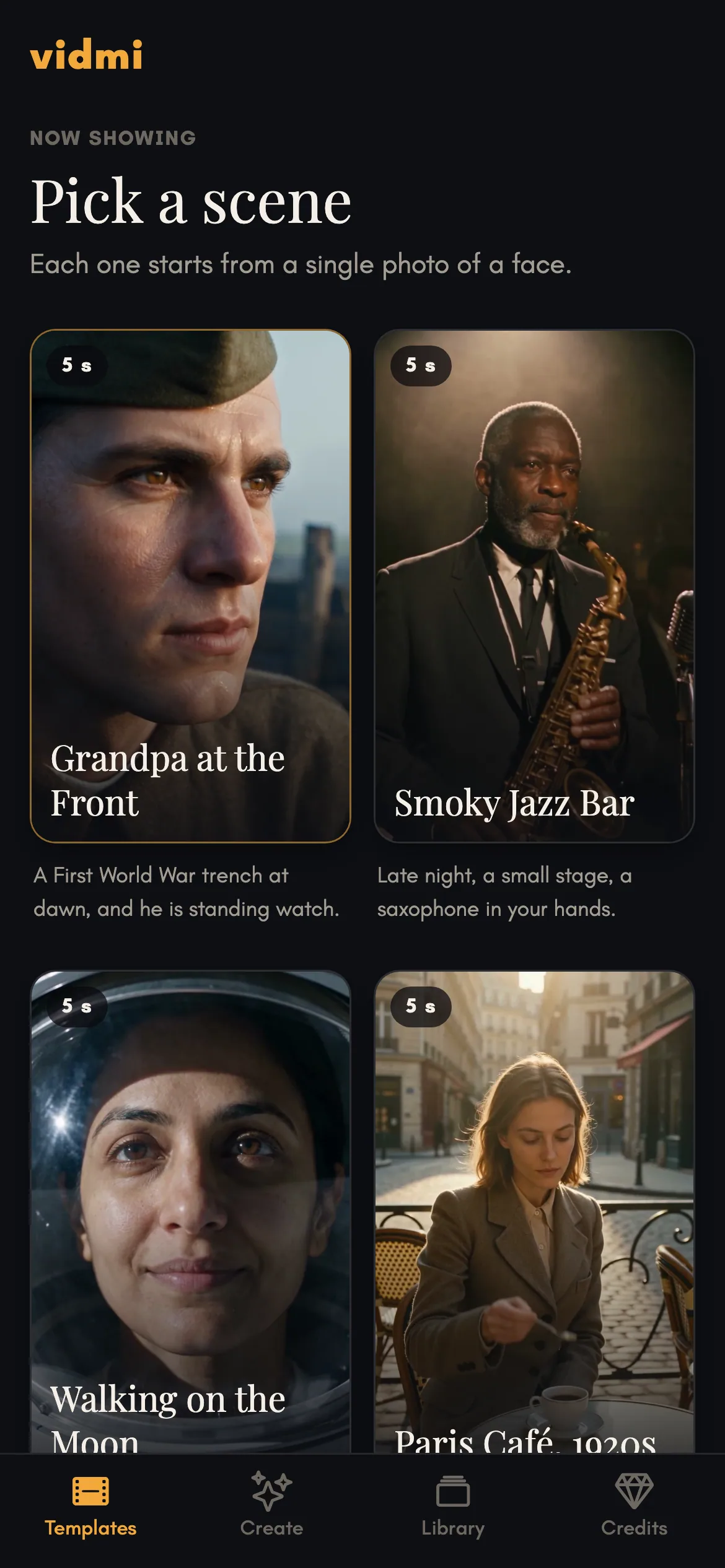
A short list on purpose
Open vidmi and the Templates tab says “Pick a scene.” Under it is a grid of ready-made scenes, and you reach the end of it quickly.
That is deliberate. A long menu makes you browse. A short one makes you choose, add a photo, and see your film.
It also means the scene you want may not be there. If it is missing, you do not have to wait for us: on the Create tab you can describe it yourself in one sentence. More on that at the end.
What follows is not a rulebook or a checklist. It is four questions we ask of a scene idea, and you can hold each one up against the ready-made scenes on the site.
Is there a reason to make it?
The first question is not “would this look good?” It is “who would you send it to?”
The app’s own opening line is “Upload your grandpa, see him at the front.” Grandpa at the Front is a scene for the family photo of a young man in uniform. Walking on the Moon is for anyone who wanted to be an astronaut at age eight.
A scene needs a feeling like that behind it: pride, nostalgia, a private joke, a birthday surprise. A scene nobody would send to anyone is a weak scene, however good it looks.
Does it work for almost anyone?
A ready-made scene starts, in the app’s words, “from a single photo of a face.” It could be yours, your grandmother’s, or your college roommate’s.
So a scene has to welcome all of them. A terrace table in 1920s Paris has room for a teenager and for a grandfather. So does the prow of a longship.
An idea that fits only one person works better as a detail than as a scene. That is what the “Customise” box is for. Add “a red scarf or falling snow,” or a detail only your family would get, and the scene becomes yours.
Is it respectful?
Several scenes borrow from history. Real people lived in those trenches and worked those fields.
The test is simple. Would you be comfortable showing the film to the person in it, or to their children? A scene that mocks a place, a culture, or an era fails that test. So does a scene built around a real famous person, and vidmi has none of those. Ready-made scenes are for you and the people you love, with photos you have the right to use.
Look at how the heaviest scene is described: “A First World War trench at dawn, and he is standing watch.” Standing watch says more than a battle would.
Is it different from the rest?
Scroll down the grid. A trench at dawn. A smoky bar at night. The Moon. A café terrace. A lantern-lit street. A fjord. Dark water. And on it goes.
Each card is its own place, its own hour, and its own mood. A new idea should add something the grid does not have yet. A second night-time city scene would sit right beside Rooftop Hero and add little.
What every ready-made scene shares
Every card has a title, a one-line description, and a sample film made in vidmi, so you can see the scene before you add a photo. Every scene runs 5 s, in 9:16.
Tap a card and you get the same controls each time: the “Use this video as reference” switch, the “Customise” box, and the “Create with this scene” button. Our page on how ready-made scenes work covers each one.
If your scene is not here yet
The list can change, and the changelog is where the site notes what is different in each release of the app. We do not promise new scenes, dates, or a number, so do not wait for one.
You can make your scene today. On the Create tab, skip the template and type under “Describe your scene in your own words.” That is Write my own, and one sentence about one person is enough.
Try this one:
- “me as a lighthouse keeper, climbing the stairs with a lantern on a stormy night”
Add a clear face photo, then tap “Preview the scene” to read what the film will show before you spend anything. If the sentence needs work, our guide on how to write AI video prompts breaks it into five parts.
The four questions work on your own idea too. Who would you send it to? Start there.
Questions
Will the scene I want be added?
We cannot promise that. The list can change, but we do not promise new scenes, dates or a number. You can make your scene today by describing it in your own words on the Create tab.
What if my idea is not a ready-made scene?
You can still make it. On the Create tab, describe your scene in your own words instead of picking a template.
Where do I see the scenes there are today?
In the app, on the Templates tab. On the site, the scenes page shows them with their sample films.