Weekend project
How to Organize Old Family Photos: Host an Archive Day
To organize old family photos, get the boxes and the people who can still name the faces to one table for a day. Then sort by branch and decade, scan, and label.
Every family has the box. It lives in a closet, it holds four generations, and only one person can still name everyone in it.
So the way to organize old family photos is not a filing system. It is a day. Bring every box, and the people who can still name the faces, to one table. Then do three jobs in order: sort the prints by branch and decade, scan them, and label each one while the names are still in the room.
Call it an archive day. You do not need special gear. You need a weekend, a few relatives, and a plan. Saturday is the table. Sunday is for tidying the list and sending it out.
Send the invitation early
Give people two weeks. Ask each household to bring its own shoeboxes, albums, and loose envelopes.
Invite the oldest relatives first and build the date around them. They are the only ones who know that the man in the hat is a great-uncle and not a neighbor.
Ask one question in the invitation: “Which photo do you most want to find?” It gives everyone something to hunt for.
Set up three stations: sort, scan, label
Use one long table and split it into three jobs.
- Sorting. Index cards mark a spot for each branch of the family and each decade. Prints go in rough piles.
- Scanning. Put this next to a window. One person shoots, one person hands over prints and keeps them in order. The steps are in how to scan old photos with your iPhone.
- Labeling. One laptop or one notebook. This person writes down what the storytellers say.
Rotate every 45 minutes. Scanning is dull by the second hour, and the teenagers are usually faster at it anyway.
Sort by branch and decade
Sorting comes first, because a sorted pile is one a relative can read at a glance.
Make the first pass by branch: one side of the family, the other side, the in-laws. Nobody has to be exact yet. Each box of old photos empties faster when the only question is “whose people are these?”
Make the second pass by decade, inside each branch. Dates are rarely written down, so use the clues in the picture: how old the children look, the cars, the clothes, a note or a date on the back.
Keep one more card marked “unknown.” That pile goes to the oldest people at the table. Identifying people in old photos is mostly a matter of asking someone who was there.
Nothing gets thrown out today. Duplicates and blurry prints get a pile of their own.
Label while the story is fresh
A scan without a name is still a mystery. It is only a tidier one.
Work in a pair. One person holds up the print and gives it the next number. The other writes down what the table says: the names from left to right, the place, a rough year, and who said so. “No. 14: Grandma Ruth, the farm in Iowa, about 1952, per Aunt Carol” is enough.
Read each line back before the print moves on. Spellings and maiden names get fixed fastest while the person who knows them is still in her chair.
Keep the front of every print clean. If a print needs a mark at all, make it a light pencil number on the back edge, and let the list carry the rest.
Name the scan files to match the list. A year, a surname, and a number will still make sense to whoever opens the folder next.
Let the stories run
The plan will fall apart around the third box. Someone holds up a wedding photo and the table stops working for ten minutes. That is the point of the day.
Set a phone on the table and record voice memos while people talk. Ask before you start, and say where the recording will go.
Good questions are small ones. Who took this picture? What happened right after? Whose car is that? There are more in our list of questions to ask your grandparents.
Pick a few faces for a short video
Near the end, make one more pile: the clearest portraits of the people everyone talked about most.
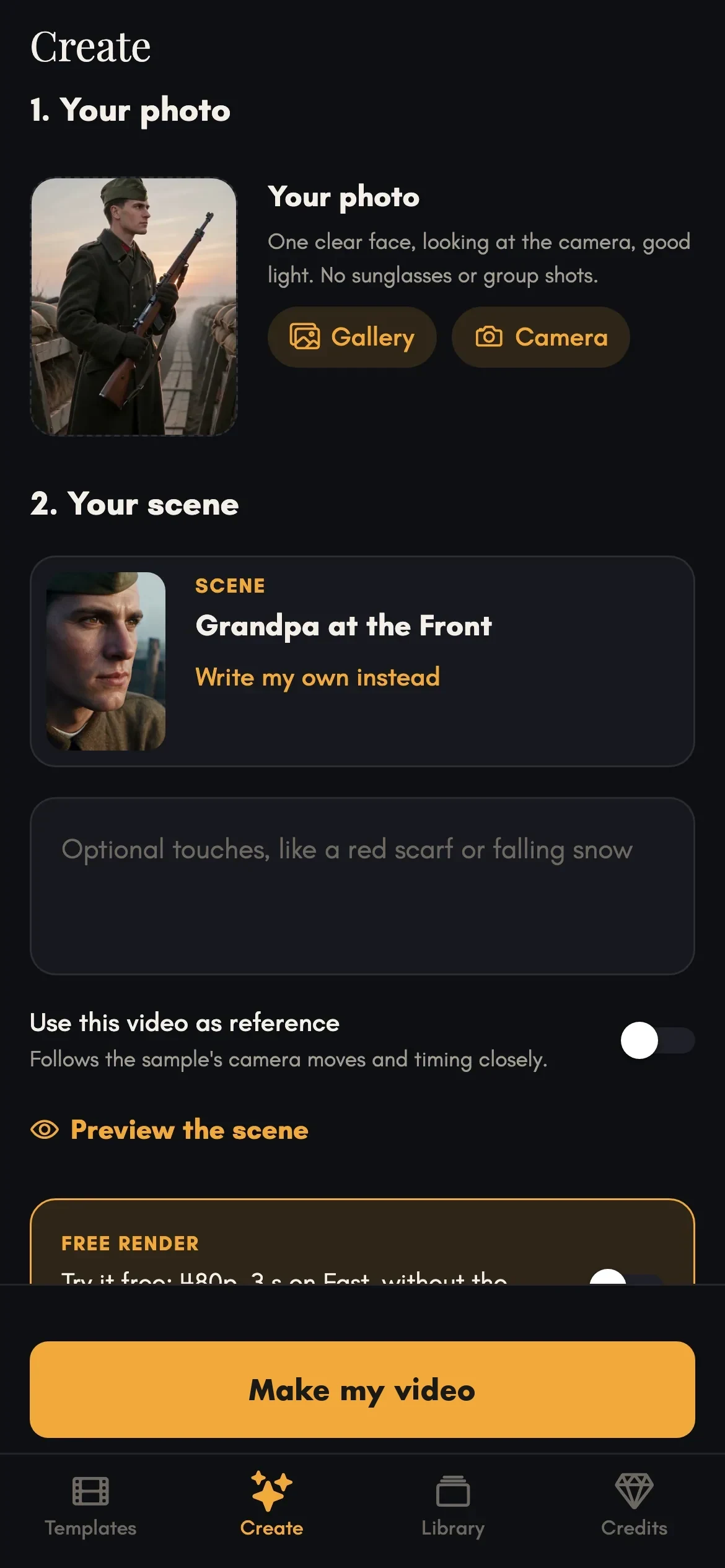
This is where vidmi comes in. It is an iPhone app that puts the face from one photo into a new short scene, 3 to 10 seconds long. The print itself does not move, and vidmi does not restore or colorize it. You get a new video starring that face. The animate old photos page shows what that looks like.
Follow the app’s own photo advice: “One clear face, looking at the camera, good light. No sunglasses or group shots.” Studio portraits, graduation pictures, and service photos tend to fit. It is one face per video. If the face you want is in a group shot, see how to crop one person out of a group picture.
Try one at the table. Take your scan of a great-grandfather who farmed, open the “Field at Dusk” scene, and tap “Create with this scene.” Or tap “Write my own instead” and type a sentence about his real life:
- “my grandpa closing up his hardware store at sunset”
Keep the scene close to who the person was. A grandmother at a 1920s café table lands differently when she is the one who told you about that café. Use photos you have the right to use.
A video can take a few minutes, and you can leave the screen while it is made. Start one, go back to the table, and if you allowed notifications, let “Your video is ready” call everyone over.
Before everyone leaves
Hand the originals back to their owners in the envelopes they came in.
Put the scans and the label list in one shared folder and send the link once the list is tidy. Save any finished videos with “Save to Photos” and add them to the same folder.
Then pick the next date. The albums you never opened are a good reason for a second round, maybe at the next family reunion. If the labeling turned up names nobody could place, that is the start of a family history project.
Questions
How many photos can we get through in one day?
Fewer than you hope. Once the stories start, a single box can fill the afternoon. Pick the boxes that matter most and leave the rest for a second day.
How do you identify people in old photos when nobody is sure?
Start with the oldest relatives at the table. Check the back of the print for a note, and compare the face with a photo you have already labeled. What is left goes in an unknown pile, and those scans go to the relatives who could not come.
Do we need a scanner?
No. A phone camera and soft light from a window give you a good working copy of most prints. Our scanning guide walks through the setup.
Which photos work for a vidmi video?
One clear face, looking at the camera, good light. No sunglasses or group shots. A formal portrait usually beats a candid.