Opinion
Why We Mark Every Video
Every vidmi film carries a small mark in the corner. We put it there on purpose, and we think more of the industry should do the same.
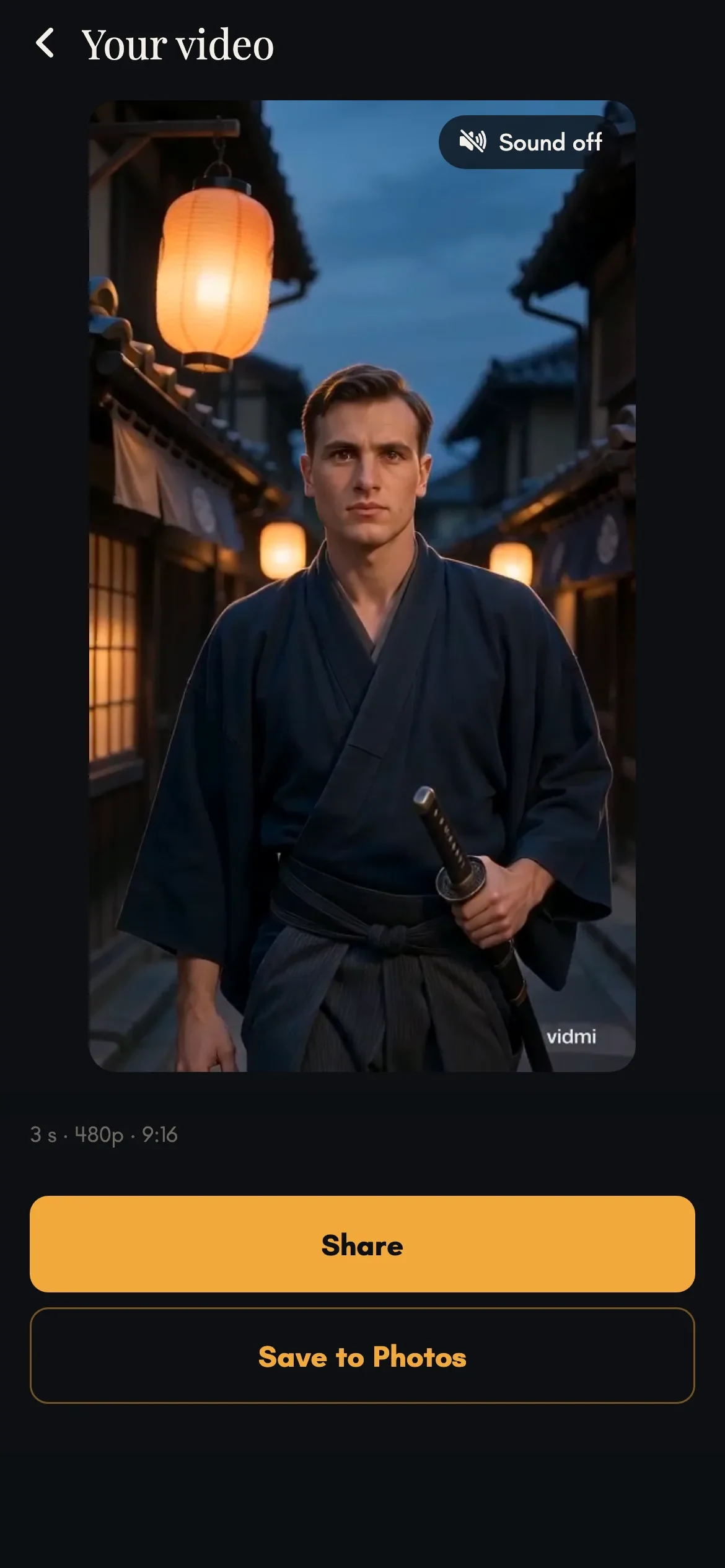
Open any film you have made in vidmi and look at the bottom-right corner. There is a small word there: vidmi.
It is on your free videos. It is on your paid ones. There is no switch to turn it off. This post explains why.
A film that never happened
Here is what vidmi does. You add one photo of a face, pick a scene, and get a short film starring that face. Your grandfather stands watch in a First World War trench at dawn. You walk on the Moon.
None of it happened. That is the whole fun of it.
It is also the reason for the mark. A film like this leaves your phone the moment you tap “Share”. It goes to a cousin, who sends it to a friend, who posts it somewhere you have never been. By the third stop, your caption is gone and so is your explanation.
The mark travels with the picture. It is the one thing you said about the film that cannot fall off along the way.
Who the mark is for
It is not really for you. You know what you made.
It is for the person three shares away who sees a soldier with a familiar face and wonders, for a second, whether a lost family photograph has turned up. It is for the aunt who does not live on her phone. It is for anyone meeting the film cold.
They deserve to know what they are looking at. A small word in the corner tells them, quietly, that this is a created film and where it came from.
Why you can’t switch it off
We could have made the mark a choice, or something you pay to remove. We did not.
A label that disappears when it is inconvenient is not a label. If only some films are marked, the unmarked ones start to look like the real thing by default. The mark only means something if it is on all of them.
So it is on all of them. Free and paid alike, same corner, same size.
We kept it small because the film is yours. It should read like a signature on a painting, not a stamp across the middle.
What we think the industry owes viewers
This is the opinion part.
We think anyone who makes tools for created video should mark what those tools produce, visibly, by default. We also think the places where video gets posted should give creators a simple label and make it easy to find.
The reason is trust, and trust is shared. Every unlabeled film that fools someone makes the next honest photograph a little harder to believe. That cost lands on everybody, including the family archive and the news.
Labels do not spoil the fun. Nobody enjoys a movie less because the credits roll. People enjoy being surprised. They do not enjoy being fooled, and they remember the difference.
Your part
The mark handles the corner of the frame. The rest is yours, and it takes about ten seconds.
- Say it in the caption. One plain line works: “Made this with vidmi from an old photo of Grandpa.”
- Use the label where you post. If the app you share to offers a tag for created media, switch it on.
- Tell family first. A tribute to a grandparent lands better when people know what it is before they press play.
- Use photos you have the right to use. Yourself, or someone close who would be glad to be in the film.
If you want ready-made wording, the guide on how to disclose an AI video has it.
Try it
Make a film from the “Walking on the Moon” scene with your own photo. On the “Your video” screen, find the mark in the corner, then tap “Share” and send it to one person with a single honest line: “Not real. Still me.”
Watch what comes back. A laugh and a “how did you make that” is the reaction you want, and nobody has to feel tricked to get it. That is the case for marking, in one message.
Read more about the vidmi mark and how we think about safety.
Questions
Where is the mark?
In the bottom-right corner of every finished video. It is the word "vidmi", kept small.
Can I remove it?
No. There is no option to remove it, on free videos or on paid ones.
Is the mark enough when I post a film?
It is a start. If the place you post has a label for created media, turn it on, and say so in your caption. Our disclosure guide has wording you can use.