Free Video Face Swap: Try It on iPhone Before You Buy
Try a video face swap free on iPhone, from one photo, with no sign-up. Free to try, then credits with no subscription. The face goes into vidmi's scenes, not yet into a video you upload.
Try it free. No account needed.
- Free face swap video
- Yes. vidmi is coming soon to iPhone, and you will be able to try a video face swap in it free. Add one photo of a face, pick a ready-made scene and make a free video: 480p, 3 seconds, on the Fast model. There is no sign-up and no subscription. After the free try you buy credits in the app.
How it works.
-
Get vidmi on your iPhone once it is out.
vidmi is coming soon to the App Store. Once it is out, open it. Three short cards, then "Make my first film". There is nothing to sign up for.
-
Pick a scene, then add the face.
On the Templates tab, tap a scene card, watch its sample and tap "Create with this scene". Then add one clear face from "Gallery" or "Camera".
-
Tap "Make my free video".
A new user with no credits is put on the free video by the app itself. You can leave the screen while it films, and the finished video waits in your Library.
Scenes that fit.
Each one has a sample film. Add one photo of a face and star in it.
Prompts to copy.
Copy one, open vidmi and paste it into “Describe your scene” on the Create tab. If a scene is already chosen there, tap “Write my own instead” first. Then add a photo.
- 01
Stonemason in the yard
Me as a stonemason tapping a chisel into a block of white marble in an open yard, dust rising in the noon light.
- 02
Trapeze platform
Me as a trapeze artist chalking my hands on the high platform of a circus tent, a spotlight swinging up to find me.
You can try a free video face swap on iPhone with vidmi. Add one photo of a face, pick one of the ready-made scenes, and the app makes a short video starring that face.
There is no sign-up. The app states the offer in one line: “Try it free: 480p, 3 s on Fast.”
Two limits, so you know before you download. It is free to try, and after that you buy credits in the app, with no subscription. And the face goes into vidmi’s scenes, not yet into a video you upload.
If you searched for a free AI face swap video and kept meeting a paywall or a weekly plan, here is the whole deal: what the swap is, which scene to spend the free try on, and what costs credits later.
How the free swap works: a scene first, then a face
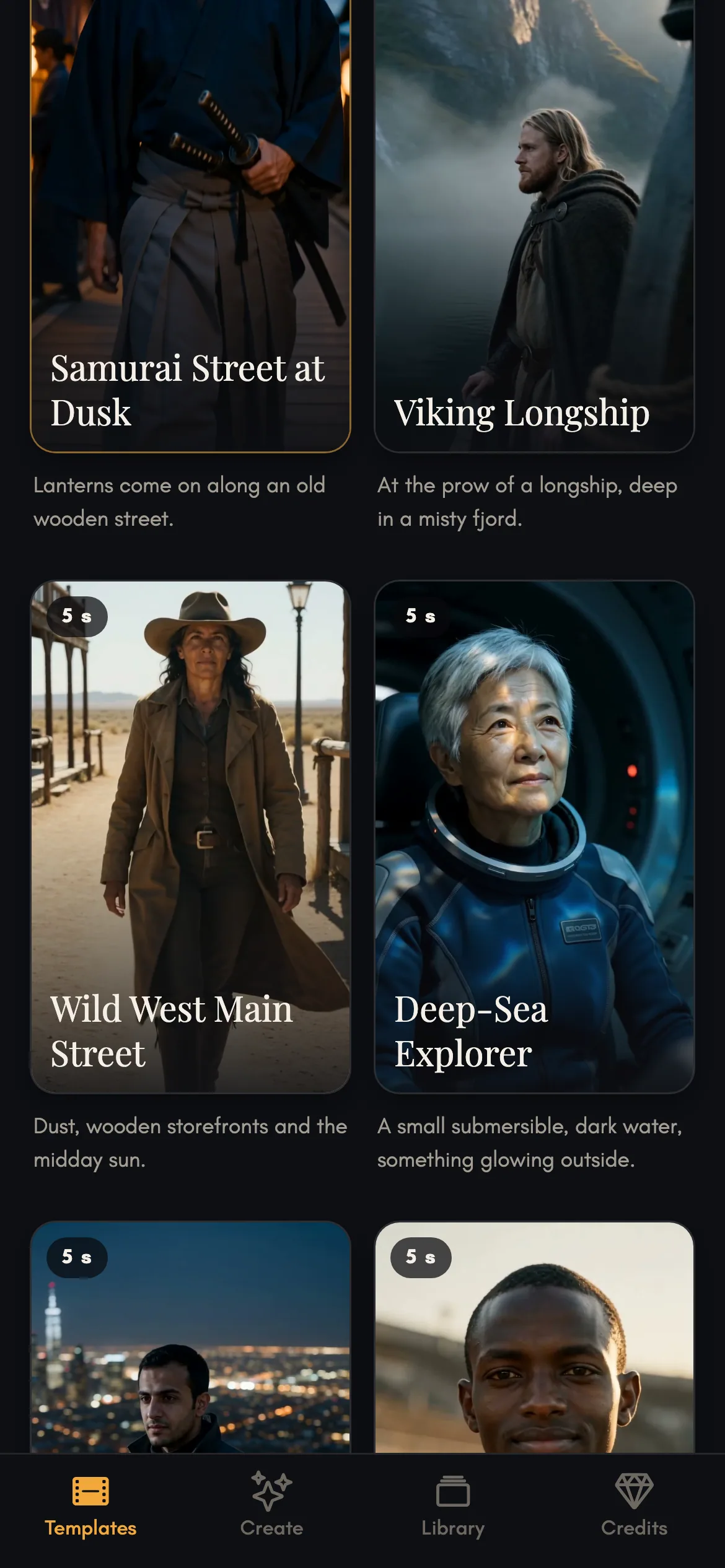
You do not upload a video. You start from a scene. On the Templates tab, under “Pick a scene”, every card plays a sample film of its scene, and your video is a new take on that scene with the face from your photo in the lead.
Tap a card, watch the sample, then tap “Create with this scene”. On the Create tab, under “1. Your photo”, bring in the face with “Gallery” or “Camera”.
Set “Shape” and “Sound” under “4. Format”. The rest is already set for the free video. Then tap “Make my free video”.
What comes back is a finished video, not a preview. The “Making your video” screen says a short Fast video is “Usually 1 to 3 minutes”. You can leave that screen and find the video in your Library, labeled “free”, ready to share or save to Photos.
Want to know your way around before you start? The face swap video app for iPhone page tours all four tabs, and the iPhone app page says when vidmi is on the App Store.
Which scene to spend the free try on
The free try answers one question: how the face in your photo carries into a scene. Spend it on a scene with one simple picture, so there is little else to judge.
Wild West Main Street. “Dust, wooden storefronts and the midday sun.” One street, one person.
Samurai Street at Dusk. “Lanterns come on along an old wooden street.” A quiet street, and again one person.
Both are in the app’s grid with the rest of the ready-made scenes.
The free try also works on a scene you write yourself. Tap “Write my own instead” and type it into “Describe your scene”. Three seconds is one small movement, so ask for a single action from a single person. The two prompts on this page do that: a stonemason tapping a chisel, a trapeze artist chalking their hands.
“Preview the scene” puts the video into words before the free try is used, so you can still change the sentence.
What a free swap leaves out
A free video is fixed at four points: the Fast model, 480p, 3 seconds, and no reference video.
So do not expect it to match the sample on the scene card. Each sample runs 5 seconds, and your free video is 3 seconds at the lowest of the three resolutions. What it can tell you is whether this face and this setting go together.
The general limits of a face swap video in vidmi apply here too: one photo and one face per video, and no promise of a perfect likeness. A free video also carries the same small vidmi mark as a paid one.
Later, with credits: the reference switch
With credits, the four fixed points open up: the model, the resolution, the length and the reference video. For a face swap video, the reference is the one to know.
On a ready-made scene, “Use this video as reference” makes your video follow the sample’s camera moves and timing closely, and it costs more credits than leaving it off. The page on the reference video switch explains it.
Credits are bought inside the app as one-time purchases, and you pay only for what you make. Nothing is charged by surprise: every paid video shows its cost in credits on the main button before you tap, as “Make my video · N credits”.
A video that fails costs you nothing. It gives its credits back automatically, and a failed free video gives the free try back. The pricing page explains how credits work.
When a scene earns a longer, sharper take, tap “Make another” and choose Quality or Max.
No sign-up and no weekly subscription
vidmi has no account, so no login wall stands between you and the free try. The app does not ask for a name, an email or a phone number.
There is no subscription either, weekly or otherwise. Credits are bought once and used when you make a video.
Having no account has one consequence worth knowing: what you make stays with the app on that iPhone. The page on video face swap with no sign-up explains what that means and why to save your videos to Photos.
Questions
Is vidmi a free face swap video app?
It is free to try, with no sign-up. A free video is made on Fast, at 480p and 3 seconds. After the free try you buy credits in the app as one-time purchases, and there is no subscription.
Can I swap a face into a video I upload?
Not yet. The face from your photo goes into vidmi's scenes, the ready-made ones or one you describe in a sentence. There is no video upload.
Does a free video have a watermark?
Every vidmi video carries a small vidmi mark in the bottom-right corner. A free video carries the same mark as a paid one.
Can I put two faces in one video?
No. It is one photo and one face per video. For two people, make one video each.
Will the face look exactly like the photo?
There is no promise of a perfect likeness. The video stars the face in your photo, and the app's own tip for that photo is "One clear face, looking at the camera, good light. No sunglasses or group shots."
Can I make a free face swap video on a computer or an Android phone?
No. vidmi is an iPhone app. Android is coming soon.