AI Video Generator App for iPhone: One Photo, One Scene, No Account
vidmi is an AI video generator app for iPhone. It makes a 3 to 10 second video starring the face in one photo. iPhone only, no account, free to try.
Try it free. No account needed.
- AI video generator app
- vidmi is an AI video generator app for iPhone. Add one photo of a face, pick a ready-made scene or type one sentence, and the app makes a 3 to 10 second video starring that face. There is no account and no subscription. It is coming soon to iPhone and free to try. Android comes after that.
How it works.
-
Get vidmi once it is on the App Store.
vidmi is coming soon to iPhone. Once it is out, open it on your iPhone. There is no account to create and nothing to fill in.
-
Add a face photo and choose a scene.
Use "Gallery" or "Camera" for the photo. Choose a ready-made scene, or tap "Write my own instead" and type one sentence.
-
Share the video or save it to Photos.
The finished video lands in your Library, with an alert if you allow notifications. "Share" opens the iPhone share sheet, and "Save to Photos" puts it in your camera roll.
Scenes that fit.
Each one has a sample film. Add one photo of a face and star in it.
Prompts to copy.
Copy one, open vidmi and paste it into “Describe your scene” on the Create tab. If a scene is already chosen there, tap “Write my own instead” first. Then add a photo.
- 01
Snowshoe morning
Me snowshoeing across a frozen meadow at sunrise, breath steaming, pine trees heavy with snow behind me.
- 02
Orchard beekeeper
My dad as a beekeeper in an apple orchard, lifting a frame of honeycomb into the late afternoon sun, bees drifting around him.
This page goes through the app itself: what it makes, the route through its four tabs, the choices it gives you, and what you need to run it.
First, the facts that rule the app in or out. It is iPhone only: Android is coming soon, and there is no iPad-specific version and no browser version. There is no account, and it is free to try.
vidmi is coming soon to iPhone. It is not on the App Store yet.
What the app makes
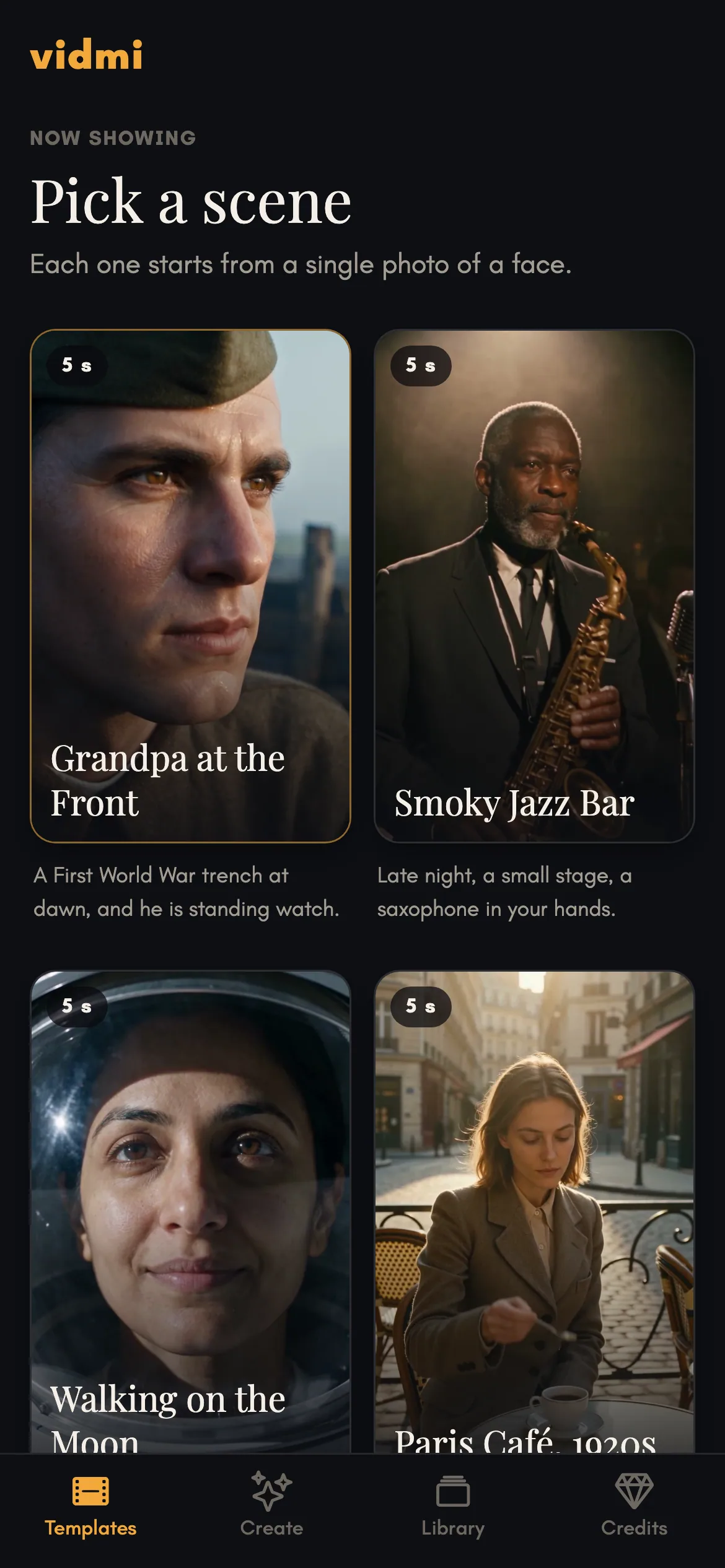
One short video at a time, with one person in it. You give it one photo of one face. It gives you a new scene with that face in the lead: standing watch in a First World War trench at dawn, holding a saxophone on a small stage, walking on the Moon with the Earth above the horizon.
Those three are ready-made scenes in the app, and each has a sample film you can watch first. The samples for those three were made with Max. The default model is Quality, so a video on the default will not look exactly like its sample.
Two things it is not. It is not a generator that works from words alone: every video starts from a face photo, and the photo itself does not start to move. And it is not a video editor: you do not upload a video, and there is no timeline, no captions and no music library.
Every finished video carries a small vidmi mark in the bottom-right corner.
From photo to finished video, inside the app
Four tabs sit along the bottom of the screen: Templates, Create, Library and Credits. A video starts in the first and ends up in the third.
- Templates. Under “Pick a scene”, scroll a grid of ready-made scenes whose sample films play as you go. Tap one, watch it, then tap “Create with this scene”.
- Create, “1. Your photo”. Tap “Gallery” or “Camera”. The app’s tip: “One clear face, looking at the camera, good light. No sunglasses or group shots.”
- Create, “2. Your scene”. Keep the scene you picked, or tap “Write my own instead” and fill in “Describe your scene in your own words”.
- The main button. It tells you what is missing or what the video will use, then starts the video.
- Library. Your videos, newest first. Tap a finished one to watch it, then tap “Share”, “Save to Photos” or “Make another”.
If you write your own scene, one sentence is enough. Two to copy:
- “Me snowshoeing across a frozen meadow at sunrise, breath steaming, pine trees heavy with snow behind me.”
- “My dad as a beekeeper in an apple orchard, lifting a frame of honeycomb into the late afternoon sun, bees drifting around him.”
“Preview the scene” shows, in words, what the video will show before you make it. For a slower walk through the screens, see what using the vidmi app is like.
What you choose: model, length, resolution, shape, sound
Every choice has a default, so you can change nothing and still get a video.
- Model: Fast, Quality or Max. Fast is “Ready in about a minute and a half.” Quality, the default, has “Richer detail and steadier motion”. Max is “Our most cinematic model.”
- Length: 3, 5, 7 or 10 seconds.
- Resolution: 480p, 720p or 1080p.
- Shape: “9:16 Stories, Reels, TikTok”, “16:9 YouTube, TV” or “1:1 Feed”.
- Sound: “Voices + sounds”, “Sounds only” or “Silent”.
Ready-made scenes add two more: a “Customise” box for small touches, and the “Use this video as reference” switch, which makes your video follow the sample’s camera moves and timing closely.
You can leave while it films
An app that makes AI videos does not need you to watch it work. The progress screen shows three steps, “Writing the scene”, “Filming” and “Finishing”, and says so itself: “You can leave this screen. We’ll notify you when your video is ready.”
For a short Fast video the app’s estimate is “Usually 1 to 3 minutes”. Quality, Max, 1080p and longer lengths take more time. You can have up to 3 videos in progress at once.
The app asks for notification permission the first time you make a video. If you allow it, your iPhone shows “Your video is ready” when one is done, and a tap on the alert opens the video. The page on video ready alerts explains how to switch them on or off.
No account, no subscription, free to try
Each of the three has its own page, so here is the short version.
- No account. There is no sign-in screen, no email and no password. You open the app and start. See the AI video generator with no sign-up.
- Free to try. In the app’s words: “Try it free: 480p, 3 s on Fast.” The page on trying the AI video generator free says exactly what that covers.
- No subscription. After the free try, videos use credits you buy in the app, and nothing renews. See how paying works with no subscription.
With no account, your credits and your Library belong to the app on that iPhone. Tap “Save to Photos” on the videos you want to keep.
What you need: an iPhone and a connection
- An iPhone. The app runs upright, in portrait, with a dark interface.
- An internet connection. Videos are made online. The app cannot make one offline.
- One face photo. Already on your phone, or taken on the spot.
Three permissions are optional: Photos, to pick a photo and save videos; Camera, to take a photo; and notifications, for the alert.
This page does not name a minimum iPhone model or iOS version. Once vidmi is out, the App Store listing will show what the app needs, and the help page on which iPhones can run vidmi covers what to do if yours is not supported.
On Android or iPad?
Android: not yet. Android is coming soon, and the Android page says where it stands.
iPad: there is no iPad-specific version. vidmi is made for iPhone.
A computer: there is no browser version. vidmi is coming soon to iPhone, so check back on your iPhone once it is out.
For everything this AI video app makes and what it does not, start at the AI video generator page.
Questions
Is vidmi an app or a website?
An app. Every video is made in vidmi on your iPhone. This website shows what the app does, and there is no browser version.
Can it make a video from a text prompt alone?
No. Every video starts from one photo of a face. The sentence you type sets the scene, and the photo supplies its lead.
Is there an Android version?
Not yet. vidmi is coming soon to iPhone, and Android after that.
How long does a video take?
The app says "Usually 1 to 3 minutes" for a short Fast video. Quality, Max, 1080p and lengths of 7 to 10 seconds take longer. You can leave the screen while it works.
Can I make videos offline?
No. Videos are made online, so you need a connection to start one.